For the founder who hands someone a URL
Skip the builder. Get an admin in 30 seconds.
$39/month per database. PostgreSQL, MySQL, MongoDB, and Google Sheets today.PostgreSQL, MySQL, MongoDB, and Google Sheets today
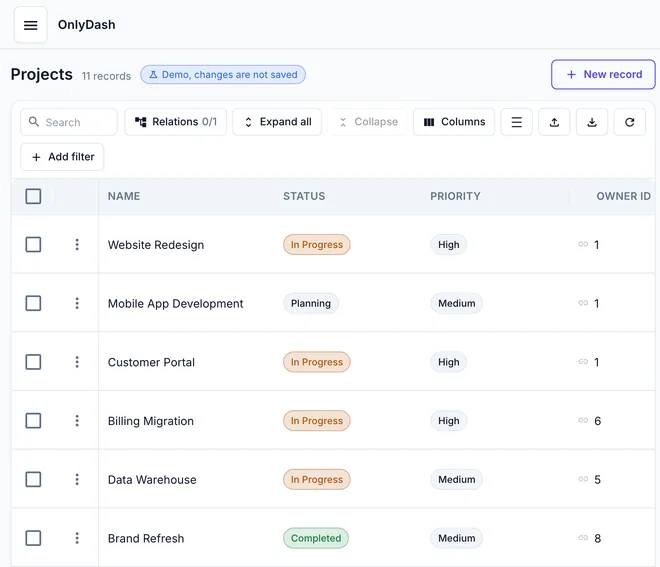
The Projects table from a live demo schema, generated without one line of UI code. The demo opens on an overview; your tables are one click away in the sidebar.
The screenshot above, from a real production Postgres — not a toy demo.
You build zero widgets. The table above is the whole UI — schema in, admin panel out.
- 43 tables
- analysed in 20s
- Your rows
- sampled, never copied out
- Read-only
- you cannot write; saves are blocked
Try as guest. No login.
- No account, no email, no password
- Opens a read-only demo schema in this browser
- Register later if you want to keep work
Have your own database?
Paste a connection string. Read-only until you say otherwise. Disconnect any time.
Connect a database
Paste a database connection string. The password stays in this tab, never in the address bar. You confirm the connection in the app.
Other “no-code” tools still want you to build the UI
Every internal-tool platform on the market hands you a drag-and-drop canvas and a panel of widgets. You still wire up each table, bind every form field, copy SQL into action nodes, and end up with a week of work before a non-technical teammate can edit a row. OnlyDash is the inverse: the database is the design.
Three steps. You build zero widgets.
What a fresh datasource looks like, from paste to live admin panel.
Paste a connection string
postgresql://… is all we need. Paste it on one field — not host, port, username, and database name as separate boxes. The password stays in this tab, never in the address bar; you confirm the connection in the app.

We read your schema
Tables, columns, primary keys, foreign keys. You watch the pass name each table as it goes — here 10 / 43, sampling entity_tags — and we infer subtypes (URL, UUID, JSON, dates, enums) from up to 1000 rows each.

Use the UI
Every table becomes a page with a data grid — search, filters, sort, pagination, and related-row expansion on the rows themselves. Edit and Create forms still pick the right input for each column type; they are not the first thing you see.
What you get on day one
A generated table you can filter, sort, and page — plus the related rows sitting on each record. Not a widget canvas.

Filter chips combine with AND / OR. Every column is searchable without a single SQL query from your side.
Edit rows, no endpoints
Create, edit, and delete rows on any table from the UI. We use your database's own keys; nothing is mirrored or duplicated.
Filters, sort, pagination
Every column is filterable and sortable. Filter groups combine with AND / OR.
Related-row expansion
Foreign keys are detected automatically and rendered as expandable links — open a row to see the related records in a child table without leaving the page.
How OnlyDash compares
| Builder tools | OnlyDash | |
|---|---|---|
| Time to a working admin panel | Days to weeks | Seconds |
| What you do per table | Add widgets, bind fields, write SQL actions | Nothing |
| When the schema changes | Edit every dashboard by hand | Re-run analyse, UI updates |
| What non-technical teammates can do | Use what you built for them | Same — and edit data straight away |
FAQFrequently asked questions
Which databases do you support today?+
PostgreSQL, MySQL, MongoDB, and Google Sheets are supported today. The connector layer is small; new sources are typically a one-week project.
Can I try it without logging in?+
Yes. Try as guest. No account and no email. You land on a read-only demo schema in this browser. Paste your own connection string when you want to.
How safe is my data?+
Your database stays where it is. OnlyDash holds the connection string (encrypted) and metadata about your schema — table names, column names, inferred types, sampled value statistics — in our own Postgres. We do not copy row data into our own storage; CRUD operations are made against your database in real time.
Will it work on my 50-table, multi-million-row database?+
Yes. Schema introspection reads from information_schema (cheap), and sampling uses TABLESAMPLE SYSTEM which is O(sample size), not O(table size). End-to-end analyse on a large production schema takes about 20 seconds.
Can non-technical teammates use it?+
Yes — the generated UI is what they use. They land on the same data grid you do, click into a row, edit it, hit save. No SQL, no widget palette, no learning curve. Roles and per-row permissions are on the roadmap.
How is this different from Retool / Appsmith / Budibase?+
Those are excellent UI builders. OnlyDash is not a builder. We do not give you a canvas with widgets to drag. We give you the finished admin panel for every table in your database, generated from the schema. If you need bespoke flows and custom widgets, a builder is the right tool. If you need the standard CRUD experience without spending a sprint on it, OnlyDash is the right tool.
What happens when my schema changes?+
Re-run analyse. New columns appear in forms automatically, new tables become new pages, and existing UI updates without manual rebinding. The metadata DB keeps every analyse attempt so you can compare what changed.
What about charts and BI?+
Shipped. Guest already draws them on the collection landing. Try as guest and you will see the figures. This is not a BI tool; the charts come with the admin panel.
What does it cost?+
$39/month per database. The whole team is included. No per-seat pricing.
On the roadmap, not in the box yet
Role-based access control, real-time updates, and shareable read-only links are next. If you need them today, email us and we'll tell you where they sit in the queue.
Stop building the same back-office over and over.
Connect your database. See the admin panel your team needs in the time it takes to read this sentence.