For the founder already running Postgres
An admin panel for your Postgres database, without building one
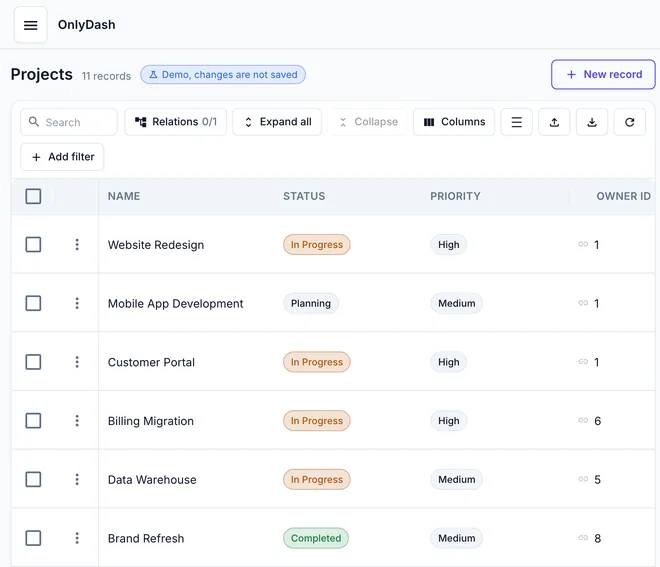
Paste a connection URL. OnlyDash reads the schema and hands back tables, filters and edit forms for every table. You drag zero widgets and write no SQL.
Three steps
- 1
Paste the connection URL
Any Postgres that accepts connections from the internet works: RDS, Cloud SQL, Neon, Supabase, Render, Railway, or your own box. Use a role that can read the tables you want in the panel.
- 2
Get the panel
OnlyDash reads the schema, samples up to 1,000 rows per table, and builds a table view, filters and an edit form for every table. A 43-table schema takes about 20 seconds.
- 3
Hand the link to a teammate
Click Create invite link and send it. They open the tables you connected, no SQL client and no database password.
A Postgres connection URL looks like this
postgresql://app_admin:[email protected]:5432/app?sslmode=requireBefore you paste
- Which schema
- OnlyDash reads the public schema. Add ?schema=name to the URL to read a different one.
- TLS
- Add sslmode=require when your host enforces TLS. Managed hosts usually do.
- Least privilege
- Connect with a role limited to the tables your team should see. A read-only role gives a read-only panel.
- Views are skipped
- OnlyDash samples base tables only. A heavy aggregate view would re-run on every batch, so it is left out.
See it on a real schema first
The guest demo runs on a 43-table Postgres database. Read-only, nothing to install.
Free for one database and one teammate. $39/month per database after that.