For the founder who hands someone a URL
Beta
Skip the dashboard builder. Get an admin panel for your Postgres database.
Paste one connection string. We read the schema, sample your data, and give you a working back office — data grids, forms, filters and edits — for every table. No drag-and-drop.
No signup for the demo. Sign up to connect your own database.
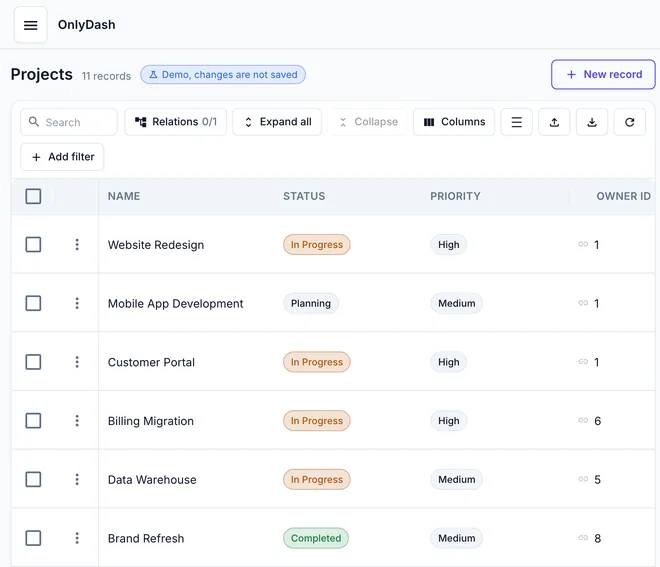
The Projects table from our demo database, generated without one line of UI code.
Free during the beta
OnlyDash is in beta and free while we build it.
Try it as a guest — no signup
No account, no email, no password. Open the demo database in your browser and click around. Sign up when you are ready to connect your own database.
- No account, no email, no password
- Opens a demo database in this browser
- Sign up to connect your own database
Have your own database?
Paste a Postgres connection string. Disconnect at any time.
Connect a database
Paste a database connection string. The password stays in this tab, never in the address bar. You confirm the connection in the app.
Other “no-code” tools still want you to build the UI
Internal-tool platforms hand you a drag-and-drop canvas and a panel of widgets. You still wire up each table, bind every form field and write SQL actions before a non-technical colleague can edit a row. OnlyDash is the inverse: the database is the design.
Three steps. You build zero widgets.
What a new datasource looks like, from paste to working admin panel.
Paste a connection string
One field, not host, port, user and database as separate boxes. The password stays out of the address bar; you confirm the connection in the app.

We read your schema
Tables, columns, primary keys and foreign keys. We sample up to 1,000 rows per table and work out what each column holds: text, numbers, dates, yes/no, emails, links, IDs, JSON, or a fixed list of options.

Use the panel
Every table becomes a page with a data grid: search, filters, sorting and pagination. Edit and create forms pick the right field for each column type.

What you get on day one
A generated grid you can filter, sort and page through, and forms for every table. Not a widget canvas.

Filters combine with AND / OR. No SQL from your side.
Edit rows, no endpoints
Create, edit and delete rows on any table from the UI. We use your database's own keys; nothing is mirrored.
Filters, sort, pagination
Every column can be filtered and sorted. Combine filters with AND / OR.
Forms that match your types
We detect text, numbers, dates, booleans, emails, URLs and enums, and render the right field for each.
Invite a colleague
Send a teammate the panel. They land on the same grid, open a row, edit it and save. No SQL.
How OnlyDash compares
| Builder tools | OnlyDash | |
|---|---|---|
| What you do per table | Add widgets, bind fields, write SQL actions | Nothing — every table gets a page |
| When the schema changes | Edit every screen by hand | Re-read the schema; forms and pages update |
| What non-technical colleagues can do | Use what you built for them | The same — and edit data from day one |
Questions
Which databases do you support?+
PostgreSQL. OnlyDash also makes admin panels from Google Sheets — see the home page.
Can I try it without signing up?+
Yes. Click Try as guest. No account and no email. You land on a demo database in your browser. Sign up to connect your own database.
How safe is my data?+
Your database stays where it is. OnlyDash stores the connection string and metadata about your schema — table names, column names, inferred types and sample statistics — in its own database. Reads and edits go to your database directly; we do not keep a copy of your rows.
Can non-technical colleagues use it?+
Yes — the generated panel is what they use. Invite them, and they land on the same data grid you do: open a row, edit it, save. No SQL, no widget palette.
How is this different from Retool, Appsmith or Budibase?+
Those are good UI builders. OnlyDash is not a builder. We do not give you a canvas with widgets to drag; we give you the finished admin panel for every table, generated from the schema. If you need custom flows and widgets, use a builder. If you need the standard create, read, update and delete screens without spending a sprint on them, use OnlyDash.
What happens when my schema changes?+
Re-read the schema from the app. New columns appear in the forms and new tables become new pages, with no manual rebinding.
Is it free?+
Yes. OnlyDash is in beta and free during the beta.
See your database as an admin panel
Open the demo as a guest. Sign up to connect your own database.